Move Beyond Broad Network Access
Traditional remote-access VPNs establish network connectivity first and rely on surrounding controls to determine what a connected endpoint can reach. ZTXGate brings the access decision closer to each protected resource.
VPN Replacement
Move from broad network connectivity toward identity-, device-, and resource-aware access.
Explore VPN replacement →Self-Hosted ZTNA
Run the access platform in infrastructure operated by your organization or MSP.
Explore self-hosted ZTNA →Security & Trust
See how identity, device trust, policy, auditability, and customer- or MSP-operated deployment fit together.
Explore security →Everything You Need to Control Access
Apply least privilege, individual device identity, temporary access, identity integration, monitoring, and audit visibility from one product. Give each person access only to the applications and resources their role requires. Use standing access where it makes sense or request-and-approve access that expires automatically. Enroll laptops, phones, and tablets individually and revoke a single device without disrupting the others. Deploy on-premises, in the cloud, hybrid, or air-gapped without a mandatory CoreZT-hosted cloud control plane. Use OIDC for sign-in and SCIM to keep users and identity lifecycle changes synchronized. Require supported additional verification methods for sensitive resources according to policy. Forward relevant events to monitoring tools through syslog, CEF, or JSON. Search and export access, authentication, and policy records for investigations, reviews, and audit activities.Right-Sized Access
Access That Expires
Every Device, Under Control
Runs Where You Do
Identity on Autopilot
Step-Up Verification
Plugs Into Your SOC
Evidence When You Need It
From Install to First Secure Connection
Start with a small deployment, validate the access model, and expand at your own pace.
- 1
Install
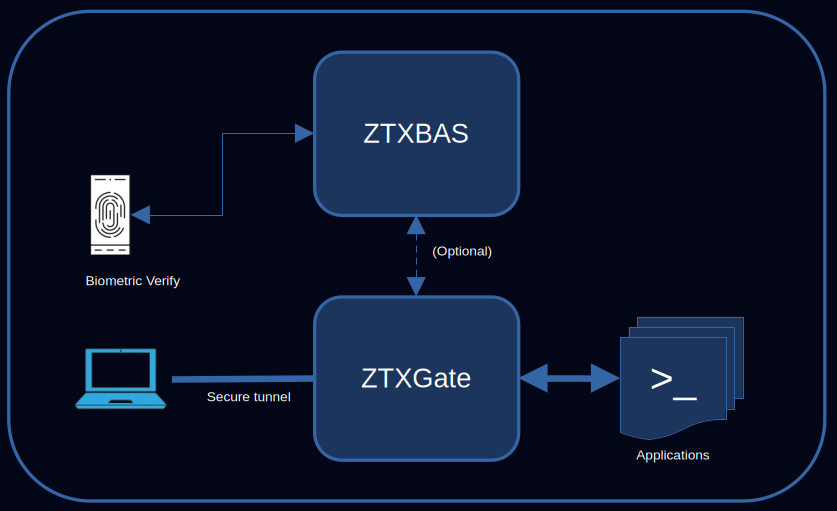
Install the ZTXGate package on a Linux server or cloud VM.
- 2
Enroll
Users enroll their devices through a self-service process.
- 3
Define
Set who can reach which resources using identity, device, posture, time, and other policy conditions.
- 4
Enforce
ZTXGate evaluates access against policy and continues to enforce it as relevant conditions change.
A Different Access Model
Modern VPN deployments can be tightly secured. The difference is architectural: ZTXGate is designed around authorization to defined resources from the start.
| When it matters | Traditional remote-access VPN | ZTXGate |
|---|---|---|
| Primary access scope | Network connectivity governed by network controls | Defined applications and resources |
| Access duration | Commonly standing unless separately controlled | Standing, temporary, or request-and-approve |
| Identity lifecycle | Depends on the surrounding VPN and directory stack | OIDC authentication and SCIM provisioning |
| Device control | Depends on the VPN and endpoint stack | Individual enrollment plus posture inputs |
| Audit visibility | Varies by VPN and supporting systems | Searchable access, authentication, and policy records |
Deploy Where Your Infrastructure Lives
Core ZTXGate access operation does not require a mandatory CoreZT-hosted cloud control plane.
On-Premises
Run ZTXGate inside an office or data center under customer or MSP operation.
Cloud
Deploy ZTXGate on a Linux VM alongside cloud-hosted applications and infrastructure.
Hybrid
Apply the same access model across infrastructure that spans on-premises and cloud environments.
Air-Gapped
Deploy the core access platform in isolated environments without depending on a CoreZT-hosted cloud control plane.
Manage Access From One Place
Manage users, devices, resources, policies, active sessions, audit records, and license information from a central web interface. Built-in administrative roles let policy ownership remain with administrators while day-to-day support and read-only oversight can be delegated.
Explore Security & Trust → · Clientless ZTNA →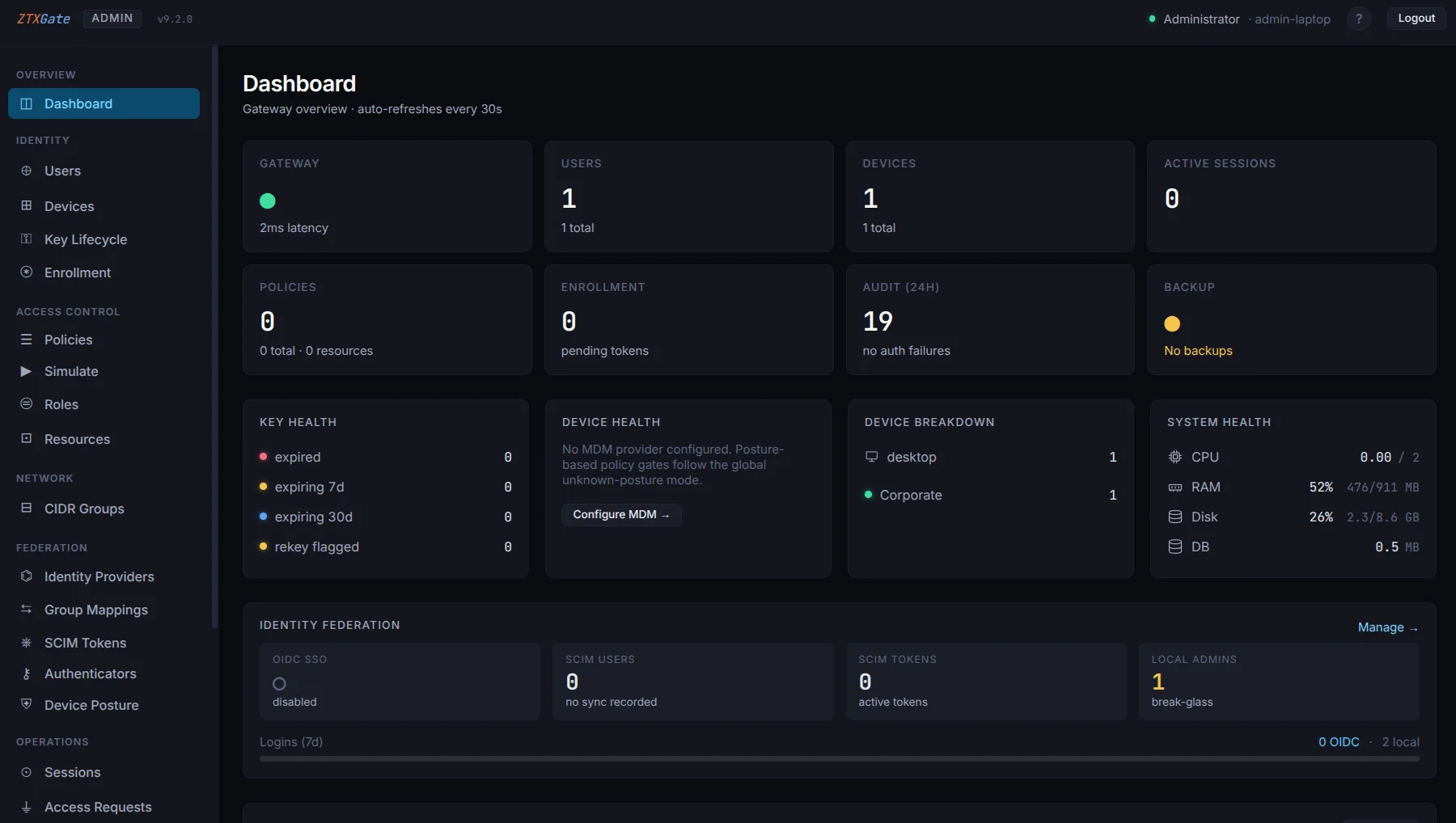
Start With the Infrastructure You Already Have
Install ZTXGate on a Linux server or cloud VM, enroll a small group of users, define access to a few resources, and expand from there.
Reach the Right Team
Pricing, demos, and onboarding
sales@corezt.comTechnical help and customer support
support@corezt.comProduct, deployment, licensing, or partnership questions
Contact us