On-Premises Zero Trust Network Access
Bring Zero Trust access to applications and infrastructure that already live inside your data center, office, branch, or private environment.
ZTXGate runs inside infrastructure you operate, so you can apply identity-, device-, and resource-aware access without making core access depend on a CoreZT-hosted cloud control plane.
What On-Premises ZTNA Means
On-premises ZTNA keeps the access platform close to the applications and systems it protects.
Instead of sending every access decision through a vendor-operated cloud service, ZTXGate can run on Linux infrastructure operated by the customer or an MSP inside the environment where protected resources already exist.
That model can be useful when:
- important applications remain inside a private data center
- internal systems should stay under local operational control
- Internet connectivity is limited or intentionally restricted
- deployment location is an architectural or regulatory consideration
- the organization wants the same policy model for local and remote users
On-premises describes where the access platform runs. It does not require the surrounding environment to be disconnected from cloud identity, MDM, EDR, SIEM, or other services if the organization chooses to use them.
Zero Trust Should Apply Inside the Network Too
Physical presence on a corporate network should not automatically determine what a user is allowed to reach.
ZTXGate lets access remain centered on the user, device, resource, and policy whether the user is remote or already inside an office or data center environment.
A developer can be authorized for development systems without receiving access to unrelated production resources. A finance user can reach approved applications without being treated as trusted simply because the endpoint is connected to an internal network.
The same policy concepts can therefore apply across local and remote access.
How ZTXGate Runs On-Premises
A typical deployment places ZTXGate on Linux infrastructure operated by the customer.
Managed endpoints use WireGuard-based connectivity when tunnel access is appropriate. HTTP and HTTPS applications can also be exposed through ZTXGate's clientless proxy where browser-based access is the better fit.
At a high level:
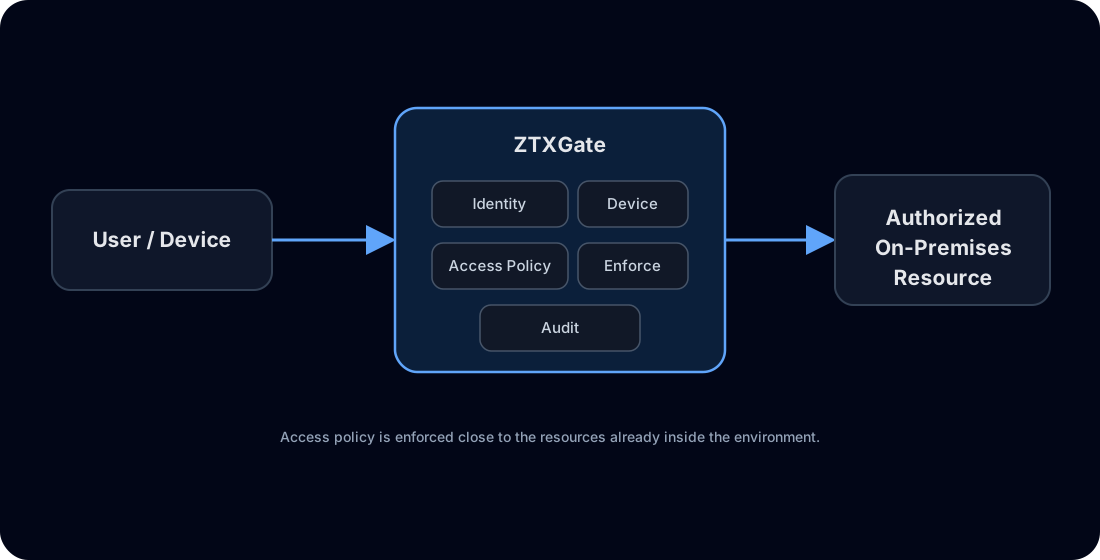
The protected application does not need to become publicly reachable simply because users need remote access to it.
Keep Local Traffic Local
When ZTXGate and the protected resources are deployed in the same environment, access does not need to be hairpinned through a CoreZT-hosted service.
That can simplify the traffic path for private applications and helps organizations retain control over where the access infrastructure operates.
External integrations remain optional architectural choices. For example, an organization may use a cloud-hosted identity provider while keeping ZTXGate and application traffic on-premises.
Use Existing Identity and Device Systems
A customer- or MSP-operated deployment does not require a separate identity silo.
In connected environments, ZTXGate can integrate with:
- OIDC identity providers for authentication
- SCIM for user lifecycle synchronization
- supported MDM and EDR platforms for device posture
- SIEM platforms for event visibility
- supported step-up authentication methods
The access platform remains on-premises while those integrations are used where appropriate.
For environments where external services are unavailable, ZTXGate can instead operate with the services and security signals that are reachable inside that environment.
ZTXBAS Across Deployment Models
When licensed with ZTXGate, ZTXBAS is tightly integrated as a library and works across connected, on-premises, and fully air-gapped environments without requiring a separate ZTXBAS server deployment.
That makes it useful where an organization wants phishing-resistant biometric authentication without making that authentication path depend on an Internet-hosted MFA service.
Cloud-dependent options such as Okta Verify or Duo remain available for connected deployments where those services are reachable.
Standalone or Centrally Managed
ZTXGate can operate as a standalone deployment.
Connected deployments can optionally use ZTXHub, a service owned and operated by CoreZT. ZTXHub provides centralized software update management and license management across deployments.
The important point is that ZTXHub is optional.
Explore the control-plane model
A deployment that does not use ZTXHub can continue operating ZTXGate independently, including in isolated environments. In that model, licensing and software updates are handled manually.
This gives organizations a choice between:
| Operating model | Standalone ZTXGate | ZTXGate with optional ZTXHub |
|---|---|---|
| Core access operation | Customer or MSP operated | Customer or MSP operated |
| CoreZT-hosted cloud dependency | Not required | Not required for ZTXGate access operation |
| License management | Manual | Centralized through CoreZT-operated ZTXHub |
| Software update management | Manual | Centralized through CoreZT-operated ZTXHub |
| Air-gapped deployment | Supported | Depends on the chosen hub/network architecture |
Resource-Level Access
On-premises deployment does not mean returning to broad network trust.
ZTXGate policies can consider:
- user identity
- role
- enrolled device
- device posture where available
- network location
- time
- resource
- access duration
This lets an organization keep private applications on-premises while applying an access model based on explicit authorization.
Temporary and Approved Access
Sensitive on-premises systems often need occasional administrative or troubleshooting access rather than permanent permissions.
ZTXGate supports temporary and request-and-approve access so an authorized approver can grant a defined access window and allow that permission to expire automatically afterward.
This can be used for production systems, administrative applications, temporary projects, and third-party work.
Backup and Disaster Recovery
ZTXGate does not provide conventional high availability clustering.
Instead, the administration portal can be configured to create periodic backups of the deployment. If a deployment is lost, a backup can be restored into a fresh ZTXGate installation to recover the configured environment quickly.
This is a backup-and-restore disaster recovery model, not active/active or active/passive HA.
Organizations should plan backup frequency, backup protection, replacement infrastructure, and recovery procedures according to their own recovery objectives.
On-Premises ZTNA vs Cloud-Delivered ZTNA
Neither model is automatically right for every organization.
| Consideration | Cloud-delivered ZTNA | On-premises ZTXGate |
|---|---|---|
| Control infrastructure | Primarily vendor operated | Customer or MSP operated |
| Deployment location | Defined by service architecture | Chosen by customer or MSP |
| Infrastructure maintenance | Primarily vendor responsibility | Customer or MSP responsibility |
| Local application traffic | Architecture dependent | Can remain within the selected deployment environment |
| External service dependency | Usually inherent to service | Core ZTXGate access does not require CoreZT-hosted control plane |
| Air-gapped operation | Architecture dependent | Supported standalone model |
| Recovery model | Vendor/service dependent | Backup and restore into a fresh deployment |
Cloud-delivered ZTNA can reduce infrastructure-management work. On-premises ZTNA provides greater control over placement and operation.
Where On-Premises ZTNA Fits
ZTXGate may be worth evaluating when you need Zero Trust access for:
- private data-center applications
- internal administrative interfaces
- office or branch infrastructure
- hybrid environments with important on-premises resources
- restricted networks
- organizations that prefer to operate security infrastructure themselves
For fully disconnected environments, see Air-Gapped ZTNA.
For the broader deployment model, see Self-Hosted ZTNA.
Frequently Asked Questions
Does on-premises ZTNA require Internet access?
Core ZTXGate access operation does not require a CoreZT-hosted cloud control plane. External integrations require connectivity only when you choose to use those services.
Can local users be governed by the same policies as remote users?
Yes. Policy can remain centered on identity, device, resource, and context rather than assuming that local network presence is sufficient authorization.
Can we still use our cloud identity provider?
Yes, when the identity service is reachable. Keeping ZTXGate on-premises does not prevent the use of cloud identity services.
Do we need ZTXHub?
No. ZTXHub is optional and is owned and operated by CoreZT. Standalone deployments use manual license and software update workflows, while connected deployments can use ZTXHub for centralized license and software update management.
Does ZTXGate provide high availability?
Not in the conventional clustering sense. ZTXGate uses a backup-and-restore disaster recovery model so a saved configuration can be restored into a fresh deployment.
Keep Access Close to the Systems You Operate
Bring Zero Trust policy to on-premises applications without forcing the access platform into a vendor-hosted cloud service.