ZTXBAS: Phishing-Resistant Biometric Authentication
Phishing-Resistant Biometric Authentication for Modern Applications
As a standalone product, ZTXBAS is a free, self-hosted biometric authentication server for developers who want to add biometric authentication to their own applications. Run one container, point a sample app at it, scan a QR with the ZTXBAS mobile app, and get a working phishing-resistant biometric login without a CoreZT account, license server, or phone-home dependency.
ZTXBAS is also available as a licensed capability inside ZTXGate. In that model it is tightly integrated as a library and does not require a separate ZTXBAS server deployment. The integrated capability works across connected, on-premises, hybrid, and fully air-gapped ZTXGate deployments.
The Problem with Traditional MFA
- SMS codes are intercepted through SIM swapping.
- TOTP tokens are captured by real-time phishing proxies.
- Push notifications fall victim to MFA fatigue attacks.
- Hardware tokens are expensive and easily lost.
Traditional MFA was designed for a different era. Modern phishing operates in real-time, relaying credentials and codes instantly.
How ZTXBAS Works
ZTXBAS combines biometric verification with cryptographic origin binding — every authentication request is bound to your application's origin, so a stolen approval on phishing.example.com can't be replayed against app.example.com.
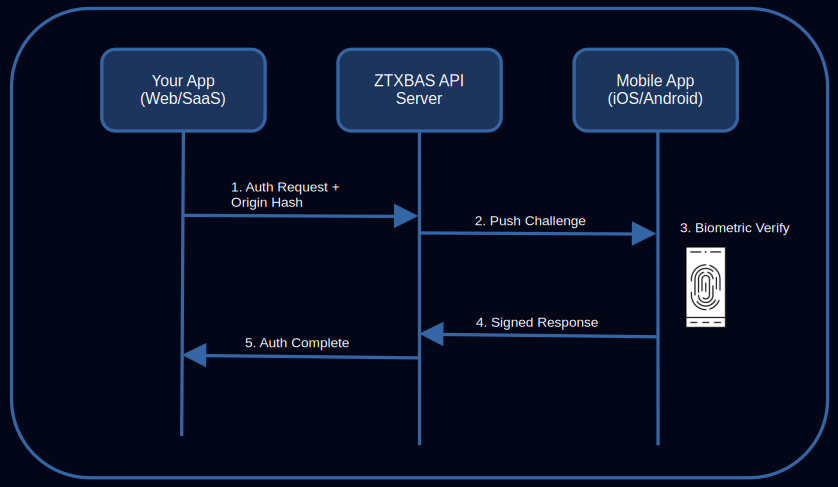
The Authentication Flow
- User initiates login on your application.
- Your app calls
POST /v1/auth/challengewith the user identifier and the origin. - ZTXBAS validates the origin against the ones registered for your application and pushes a challenge to the user's phone.
- User approves with Face ID / Touch ID / fingerprint.
- Your app either polls
GET /v1/auth/status/{id}or receives a signed webhook. On success it gets a short-lived ES256 JWT identity assertion bound to the user and the origin. - Your app verifies the JWT against the public JWKS at
/.well-known/jwks.jsonand creates its own session.
The JWT is the security boundary — RPs never have to trust the transport alone.
Why ZTXBAS is Phishing-Resistant
- Origin binding. Each challenge is bound to a registered origin; the mobile app shows that origin to the user before they approve.
- Device-bound keys. Private keys live in Secure Enclave / TEE. Biometric templates never leave the device.
- No shared secrets. Nothing to intercept, phish, or replay — just short-lived signed assertions.
For a protocol-level explanation, read the Phishing-Resistant Authentication Guide.
What You Get
ZTXBAS Server
Single container. SQLite (WAL) for storage; nothing else to deploy.
- HMAC-SHA256 signed API — roughly a dozen endpoints
- Signed JWT identity assertions + public JWKS
- Webhooks with HMAC-signed payloads and retries
- Embedded admin console (applications, users, origins, live challenges)
- Structured JSON logs, per-application rate limiting
- HTTPS in production; HTTP allowed on
127.0.0.1for dev
Distribution:
- OCI image on GitHub Container Registry:
ghcr.io/corezt/ztxbas - Static Linux binaries (amd64, arm64) on the GitHub releases page
ZTXBAS Mobile App
The same app is used for both ZTXBAS and ZTXGate — upgrade the server later without touching phones.
- iOS — Face ID / Touch ID, Secure Enclave key storage, iOS 14+ App Store
- Android — fingerprint / face, hardware-backed keystore, Android 8+ Google Play
SDKs
Official SDKs handle HMAC signing, polling, and JWT verification:
- Go —
github.com/corezt/ztxbas/sdk-go - Node / TypeScript —
@corezt/ztxbas - Python —
corezt-ztxbas
ZTXBAS with ZTXGate
Standalone ZTXBAS and ZTXGate-integrated ZTXBAS use the same mobile authenticator but have different deployment models.
| Use model | Standalone ZTXBAS | ZTXBAS with ZTXGate |
|---|---|---|
| Primary purpose | Add biometric authentication to your own application | Step-up biometric authentication inside ZTXGate access policy |
| Pricing model | Free standalone product | Licensed ZTXGate capability |
| Server deployment | Separate ZTXBAS server/container | No separate ZTXBAS server; tightly integrated as a library |
| Connected deployment | Yes | Yes |
| Air-gapped deployment | Yes | Yes |
| Mobile app | ZTXBAS mobile app | Same ZTXBAS mobile app |
If you are integrating biometric authentication directly into an application, use standalone ZTXBAS. If you are using ZTXGate, the licensed integrated capability is part of the ZTXGate access architecture rather than another server that must be installed and maintained.
Integration
# Request an authentication challenge
curl -X POST https://ztxbas.example.com/v1/auth/challenge \
  -H "X-Application-ID: app_a1b2c3d4e5" \
  -H "X-Signature: <HMAC-SHA256 signature>" \
  -H "Content-Type: application/json" \
  -d '{
    "email":  "alice@example.com",
    "origin": "https://app.example.com"
  }'

# Response
{
  "challenge_id":    "ch_abc123",
  "expires_in":      120,
  "origin_display":  "Example App",
  "origin_url":      "https://app.example.com",
  "challenge_hmac":  "..."
}
The SDKs sign for you — writing this by hand is fiddly. See the Getting started guide for a full end-to-end example.
Security Posture
- HTTPS enforced in production; HTTP only on loopback
- HMAC-SHA256 request signatures, timing-safe comparisons
- JWT signing key auto-generated on first run, file mode 0600
- Admin console: PBKDF2-HMAC-SHA256 password hash (600k iterations), session cookies, optional biometric protection via ZTXBAS itself
- SQLite in WAL mode, file mode 0600
- No secrets in logs; structured JSON to stdout
- Rate limiting per-application on public endpoints, per-IP on admin
Full details in the Hardening guide.
Standalone Pricing
Standalone ZTXBAS is free. Downloadable binaries and container images are available on GitHub under the CoreZT EULA. No CoreZT account, telemetry, or license server is required for the standalone product.
The ZTXBAS capability integrated with ZTXGate is licensed as part of the ZTXGate deployment model. See ZTXGate pricing and licensing.
Frequently Asked Questions
What happens if a user loses their phone?
Deregister the user via DELETE /v1/users/{id} (or from the admin console) — the device's keys become invalid immediately. Re-enroll them with a new device through your account recovery flow.
Does standalone ZTXBAS work offline?
Yes. Standalone ZTXBAS is self-hosted and can run on an air-gapped network. SMTP is required for enrollment emails, so an air-gapped deployment can use an internal relay. The licensed ZTXBAS capability integrated with ZTXGate also works in air-gapped ZTXGate deployments without a separate ZTXBAS server.
How does ZTXBAS compare to passkeys / WebAuthn?
Both are phishing-resistant. Passkeys are browser-native and great when the client is a browser you control. ZTXBAS is a server-mediated push flow that works from any client (mobile app, CLI, service-to-service) and gives you a single signed JWT to consume server-side. They're complementary; use passkeys for browser login and ZTXBAS for step-up, mobile, or non-browser flows.
Is ZTXBAS FIDO certified?
No. ZTXBAS uses similar cryptographic primitives (ECDSA on device, HMAC on the wire, JWTs to the RP) but is not FIDO certified.
When do I need ZTXGate instead?
Standalone ZTXBAS handles one application per instance, self-hosted, with a local admin console. If you need multi-tenancy, admin RBAC and SSO, SCIM, device posture integration, SIEM export, or policy-enforced access to broader network resources through ZTXGate's client-based path—including non-web services such as SSH and RDP—that is ZTXGate. ZTXGate also provides licensed clientless HTTP/HTTPS access for supported web applications. When ZTXBAS is licensed with ZTXGate, it is integrated as a library rather than deployed as a separate ZTXBAS server.
Get Started
Powered by CoreZT · For network-wide zero trust, see ZTXGate →